The Desk

The Desk
So many projects . . . so little time!

Friday, July 27, 2007

Lightning


All last year I had a poster (compliments of Compass Books) taped to the wall of the checkout desk. It was a map of the world. My students loved looking at it. Because we are a year-round school, our very well travelled staff take many interesting trips during the year. I thought it would be fun for the students to see where we were going so I asked the teachers to take our school mascot, Lightning the Leopard, with them. I went on EBay and purchased several small beanie type leopards. I chose this size because they could be packed and take up as little amount of room as a pair of socks. I asked the teachers to take digital pictures and send them back to me. I moved the map to a wall and I'm adding the pictures as they come in. When I learned about Slide I thought it would be fun to try.

So far Lightning has travelled to New York City, Seoul Korea, Russia and Australia.

Thursday, July 26, 2007

Techno Teachers

I thought I'd follow up on my comments about the technology inservice and lessons I did with the teaching staff at my school. The format was that I did three one hour sessions. Initially, I worried about not being able to fill the time. Pshaw! I ran out of time each at each session.
I have learned so many new things but I wanted to limit what I imparted this first time so as not to overwhelm.
I began by explaining del.icio.us and shared my personal experiences with it. As I mentioned earlier, the teachers received laptops that day and several of them mentioned that they had not been looking forward to redoing their bookmarks. When they learned that del.icio.us could keep track of them they were thrilled. One teacher did express concern about anyone in cyberspace able to see what you tag. The "do not share" feature was very welcomed.
All of our teachers are required to maintain a website and our district uses TeacherWeb. We've been using this for about three years and I spent some time going over some tips on working on their pages. http://teacherweb.com/CA/Laurel/SchoolHomePage/SDHP1.stm
The last part I tried to fit in was tips on their Ed1Stop pages. Our county portal had just discontinued linking to BrainPop for a variety of reasons and some time was spent on discussing alternatives they could use. We use United Streaming Video and Groliers Online and I talked about those features as well.
In upcoming staff meetings we will spend a little bit of time on mini lessons. First up is teaching how to use the calendar option and reminder feature in Microsoft Outlook. Also, in the near future I will be sharing image generating with the fourth and fifth grade teachers and brainstorm ideas on how they can use them in the classroom.

Saturday, July 14, 2007

Week #7 Thing 17


I've given some thought to this posting to a wiki idea and I can see the value, especially in the upper grades. There are many, many options for its use. In an elementary school classroom a fourth or fifth grade teacher could set it up for students to enter comments on group research topics. I found it very easy to post to the CSLA sandbox and as long as there is an option to monitor the posts I can see it used to the benefit of our digital natives.

In my library I think this would come in handy as a place for students to post comments about books they are reading. A digital book club could spring out of a wiki. They would be an excellent vehicle for GATE students.

Another suggestion might be for the California Young Reader Medal committee to establish a Wiki with this year's choices and open it up to students and educators to respond and comment. Teachers and Librarians could submit suggestions (because you know we all do it differently) and the students could offer their opinions on characters and plots. Authors and illustrators could also be offered a platform through a CYRM wiki.

On a side note . . . I held my technology lessons with teachers at our opening day inservice (our students returned to school on July 11th!) and their favorite item was Del.i.cious! They all were receiving new laptops (courtesy of a very supportive principal) that afternoon and the idea of "portable" bookmarks" was a hit. At today's staff meeting it was heartening to see each of them with her laptop open and taking digital notes. Along with our site technology rep and the district technology educator we will be doing a mini tech lesson at every staff meeting this year. Like I wrote before .... we have a very supportive principal!

Sunday, July 1, 2007

Week 7, Thing #16

English poet, Alexander Pope, wrote, "A little learning is a dangerous thing (An Essay on Criticism, 1709). That was my initial feeling about Wikis. My bias went so far as to convince the fifth grade teachers at my school to steer their students widely away from them as a research tool for students.
Because of this adverse opinion, I really felt that I needed to visit all of the samples in this exercise and give it close scrutiny. I think I was looking to validate my prejudice. My opinion of their value in student research has not changed. But now I can see that there is a place for the "wicked" wiki in the world even if it isn't my world.
The slide show created by Meredith Gorran Farkas, Norwich University, is an excellent tutorial for those wanting a clear picture of what a wiki can be used for. She also sums up, in the very first slide, the pros and cons. If you haven't already looked at it, I recommend you do (http://meredith.wolfwater.com/cil06/).

Tuesday, June 19, 2007

Safe Blog Sites For Students


This isn't one of the "things" but as I delve into this process I am trying to find ways to use what I'm learning at my school site. I would like to set up a blog site for my schools library. My dilema is that, even though I really like the ease of blogger.com, the "Next Blog" feature makes it inappropriate for student access. One suggestion from a trusted district tech guru was www.imbee.com . I would love suggestions of any others.
(The photo is our school mascot on a visit to NYC and the library!)

Thursday, June 7, 2007

Week 6 #15

Before this year I don't think I had thought too much about 2.0 and what it meant for libraries. However, this entire school year has changed that for me. I began hearing it associated with school libraries at the CSLA conference in November and continued through this adventure. I like the idea that the library changes with the times. It isn't just a recepticle for what is past, but reinvents itself as new ideas come along.

In the OCLC article by Dr. Wendy Schultz (To A Temporary Place In Time) there is a quote I love. "Libraries are not merely in communities, they are communities: they preserve and promote community memories; they provide mentors not only for the exploration of stored memory, but also for the creation of new artifacts of memory."

Our students are definately digital natives. We need to provide libraries that speak their language and materials that appeal to them while, at the same time meeting the needs of curriculum and learning styles. But we can't throw the baby out with the bathwater. So the task for school library staff is to embrace the features of 2.0 while continuing to encourage (and sometimes even coax) books into the hands of children.

What will my school library look like ten years from now? My hope is that it will still be filled with children eagerly reading...delighted faces discovering exciting new worlds on the printed page AND the computer screen.

Tuesday, June 5, 2007

Week 6, Thing 14 Technorati

I looked up School Library Learning 2.0 on Technorati and saw my desk photo there. That was pretty cool considering that they are looking at billions of posts a day. I feel a bit honored to be included.
I am attempting the "claim your blog process" so here goes:
Technorati Profile

I peeked and saw that I was able to successfully add the favorite button. Whoo-Hoo! I finished the process, created my bio and added a new photo.

Tagging was new to me and I certainly like the aspect of being able to set them up to meet my individual needs. I have used del.i.cio.us quite a bit and have already told others about it. I am planning one of the inservice sessions for the teaching staff when they return in July and tagging is at the top of my list of things to share with them.

Tuesday, May 29, 2007

Week 6, Thing #13

Yeah! Something I think I will use effectively. Social bookmarking is a handy tool for everyone. At my school level it is a great way for students and staff to have access to bookmarks wherever they are and whenever they need them. So often teachers go from classroom to lab and have to recreate their favorites for students to use. Del.icio.us is the answer to that problem.

Personally, I have already been using it. I use several different computers (at my desk, in the lab, my laptop, my home PC and one at family's business) and have often searched for something I have bookmarked only to realize it wasn't saved on the particular computer I was on at the time. This feature has already saved me time.

Setting up an account was fairly simple and after rereading the directions (novel concept!) I found the icon on my tool bar and all was good.

I enjoyed peeking into other people's bookmarks and found some interesting and useful sites. Thanks for sharing this great time saver.

Wednesday, May 23, 2007

Week 5, Thing 12

The custom search is an excellent tool for elementary school. Our district restricts students from free range surfing the Internet while at school. Students are supposed to only use sites that have been preselected by their teacher. Our teachers have all created Teacher Web web sites and all have an ED1Stop account where they can create custom listings for students. We also subscribe to Grolier Online for students to use in school and at home. Although Rollyo seems to meet the needs, I think that the choices we have already put in place are good for us. In fact, when creating my search roll for this assignment I just cut and pasted the links I already had on my library website. Here is the link to my Rollyo search for Animals: http://www.rollyo.com/search.html?q=zoo&sid=292698 .
Moving along to week 6...

Monday, May 21, 2007

Week 5, Thing 11

I guess you just can't love everything about this course. This exercise was that for me. I looked at every one of the sites and really wasn't enchanted with any of them. The one I chose to follow up on for this exercise was http://www.43things.com/tag/family. On this site people list the things they want to accomplish. I started my list.

I also joined a Library 2.0 group on Ning. I didn't see anyone else who appeared to be an elementary library worker there.

One thing that I am a little wary about is giving too much personal information out, including my email address. Both of these experiences required listing my email address. I felt like I needed to create a new email address just for these "accounts" so I signed up for an additional Yahoo email.

It was nice to have the "play" activity prior to this one. I'm looking forward to moving on to something else.

Week 5, #10 Image Generators

Well, how fun was that? I'm afraid I'm a little tardy with this blog because I was having too much fun with the image generators to take the time to write. I tried all different kinds. I emailed them to my friends. I wowed my children. I even skipped lunch to play around with them. At the foot of my blog you can find my license plate. Both the lunch bag and license plate were created at http://www.imagechef.com/ . I also had lots of fun with the visual poems feature. This could be used successfully in the classroom, giving students a creative way to display their writing. I spent a lot of time going down the list at http://generatorblog.blogspot.com/ . This would be a fantastic resource for teachers but there are some links that are adult so I wouldn't send students there. Instead, I would select a specific generator for students. I must admit to sending out several emails using http://www.kakomessenger.com/ . You'll love Humphrey and Gina.
Thanks for the "recess".

Friday, May 18, 2007

Week 4, Thing 8 & 9

I was oblivious to RSS before this lesson. I wonder why? I am an avid online reader of news sources and I never noticed that little logo in the corner. After this lesson I went back to the newspaper sites I use and, sure enough, there was the RSS logo.

I created my reader in Bloglines. The feature that appealed to me the most was being able to set up playlists that were customized. I'm still sloshing my way through using it, but I can see the wisdom of having all of my news sources in one handy location. As far as using it in an elementary school setting, I could see the value of setting up specific playlists that tied into a certain unit of study. But, like most of the internet, there would need to be definite adult supervision.

I did a little sleuthing using the various tools and found that the Google Blog search and Feedster were my favorites. I think one would have to limit their search time because you can certainly get carried away with the many avenues the searches open. I have already added several sites to my Blogline and will probably need to do more.

Wednesday, May 16, 2007

Week 3, Thing 6 & 7


Well, I had lots of fun with this one! I did my trading card, a magazine poster and several Warholized creations. I also used one of the features on this photo of my little boy.
I love these tools and could see them used in our lab with students. Several different grade levels do a biography unit during the year and the trading cards would be great for that. I think, in the library, I will try to do something with the motivational posters.
I can certainly see these tools becoming a bit addicting.

I do have a concern with Flickr in the elementary school setting. I came across several images that would not be appropriate for students. We do not let students use any image sites (i.e. Google Images) because we have had some near catastrophes in the past. At the elementary school level we will most likely limit it to staff only. However, it is a great resource for photos to enhance lessons and teacher produced PowerPoint's.
#7 I am very fortunate to be working in a school district that considers technology a priority. My library has a web site, Smart Board, laptop, four student stations, two office computers, LCD projector, document camera, wireless access, and laser printer. Our lab also features a Smart Board, LCD, laser printers and 34 stations.We have been encouraged to take advantage of training that comes along and to share it with the site staffs. My site administrator is especially supportive.
The piece of technology I use the most in my life is email. It opens up the communication process for me and allows me to keep in touch and disperse information more productively. But my favorite technology remains the Internet. I AM a life long learner and I love to find new information (albeit sometimes trivial and useless).
By the way, I did post a comment on a blog. I know I enjoy the comments left on mine.

Tuesday, May 15, 2007

Week 3, Thing #5

This was something I was comfortable with. I use digital photography a lot and I already had a Flikr account after being introduced to it at the Chocolate Tech Affaire. I was also already using Picasa.
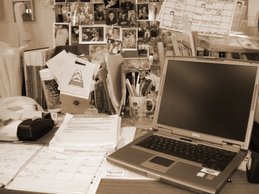
I love working with photographs and manipulating them with graphic tools. One of my favorite things to do is take a color photo and use a sepia or antiquing tool. That's what I did with the photo of my desk (which, by the way, is organized in it's own unique way) that I uploaded onto the blog. I used the blog tool to do this.
I also marked it as public and used the tag School Library learning 2.0 as instructed but when I do a search of that tag I am told that Flickr gives up and can't find anything. I can find the picture on my account and it shows the tag as schoollibrarylearning20. Several attempts to change it have proven fruitless so any assistance will be appreciated.
Also, I have a question. Is there a School Library learning 2.0 on Flikr that we should join?
I took a peek at the blogs of others and enjoyed every one's photos.

On a side note, this online learning opportunity was discussed yesterday at our district Library meeting. I tried to encourage the other library personnel in my district to join me on this journey. I am at one of only two year-round schools in our district. Everyone else is wrapping up their school year this month so I am hoping some, if not all of them will jump on board.

Friday, May 11, 2007

Week 2, Thing 3

This is a weird posting because to do the posts for Thing 1 and Thing 2 (very Seussical) I already had to establish this blog. It was a pretty easy process and I got it up and going very fast. The template process went very well and I was even able to add one of my favorite photos . . . a picture of my dad reading to my sister and I when we were children.
The next step was naming my blog. I wanted to keep a little privacy so I didn't want anything to personally revealing. Road Reader is a homage to my school library theme, Driven To Read. I have decorated my library with a car theme, complete with a road that runs all the way around the room on the walls. The road has whimsical cars created by my friend and our school artist in residence. My students love the real tires I have up on the book shelves as well.
I also chose it because as a child my family took a lot of road trips. I always had my nose stuck in a book . . . usually a Nancy Drew mystery . . . oblivious to the scenic wonders my parents tried to expose me to.
I register and was away from my blog for a while. I was pleasently surprised to find a comment from the program moderators waiting for my when I returned.
The final step was creating my graphic alter ego. This wasn't as easy a process. Too many choices and none seemed quite right. It was kind of like shopping at a store you don't like. When I finally resigned myself to the fact that I wasn't creating my identical twin it got easier. Putting her on my page was very easy using the directions provied in Thing 3.
So, I have completed the first two weeks and I have a real sense of accomplishment. I'm looking forward to Week 3.

Week 1, Thing 2

I watched the 7-1/2 Habits of Highly Successful Lifelong Learners this evening. Halfway through I couldn't help stopping and checking out the website of The Public Library of Charlotte and Mecklenburg County. After a short tour around the site I was back on task.
As I listened I was already thinking of what my goal for doing this is. I think the goal I want to set is to become comfortable to the degree that I can teach using some of these tools to the teachers at my school site.
My biggest obstacle is definately going to be time.
One frustrating item is that I was not able to open the attachments that accompanied the presentation. I did email the creator of it to ask if there is another way to get them.

Week 1, Thing 1

I was excited to get started . . . so excited that I zipped through Thing 1 so quickly that I had to go back and read it all over again. I'm a working mom so I like the work at your own pace feel of this program. But I am committed to completing it by the September deadline.

Road Reader


May 11, 2007
I attended The Chocolate Tech Affaire Technology Workshop this week at the CCCOE and then received the email today about the School Library Learning 2.0 . So, I am ready to dig in and blog away.

The initial setting up of this blog was very easy. Now I just need to see if I can keep it up and if it is worth the time and effort. I love technology and I love sharing what I learn with other staff members, as well as learning from them.

I consider myself a "lifelong learner". I love learning and finding out new things. One of my favorite things is to hear about something and then seek out more information on that subject. For example, if I read or hear about a movie based on a real event, I immediately look up what the real story is. It's like a treasure hunt to me.

And so I am setting off on this CSLA School Library Learning 2.0 road and looking forward to what I'll find along the way.